

The first thing most people want to know about Making Tax Digital is the money bit. What will it actually cost you, in real life, once you add up software, accountant time, and the extra admin of doing things more often. The honest answer is that it depends on how organised your records are, whether you already use bookkeeping software, and whether you do it yourself or hand it to an MTD accountant. HMRC’s own estimate is £320 for a one-off transitional cost and £110 a year ongoing, and that’s a useful starting point. Some people will come in under that because they’re already keeping tidy digital records. Others will go over it because they’re starting from a shoebox of receipts, or because quarterly updates mean four chances a year to fall behind. It’s manageable, but it isn’t free – and it’s worth thinking about the time cost as well as the invoice cost.

MTD is not a new tax. It does not change the rate of tax you pay. It is about how you keep your records and how often you send information to HMRC.
In plain English, Making Tax Digital means you keep digital records (so your sales and expenses are recorded in a digital form) and you send updates more often. For Income Tax MTD, that usually means quarterly updates during the year, plus an end-of-period finalisation at the end to confirm the figures and make any adjustments. So you are doing the same basic job as a tax return, just broken into more steps.
This is where people get crossed wires. The tax you owe is one thing. The cost of complying is another. Compliance is the admin of tracking income and expenses, keeping them in a format HMRC accepts, and sending the updates on time. You can owe very little tax and still have a fair bit of compliance work. Or you can owe a lot of tax but have simple records and keep the admin cost down.
A practical way to think about it is three buckets. Software cost. Professional fees. And your own time.
Software cost is the subscription (or free option) you use to keep records and submit updates. Even if the software is free, you are still paying in a way, because you have to set it up, learn it, and keep using it properly. Paid tools can save time if they pull in bank transactions, capture receipts, and reduce the number of things you need to type by hand. The thing is, the cheapest option is not always the lowest cost once you include the hours you spend fighting with it.
Professional fees are what you pay your accountant or bookkeeper to help you stay compliant. Some clients will want a light-touch review each quarter, just to make sure nothing has gone off the rails. Others will want it fully handled. Fees can go up simply because there are more deadlines and more touchpoints through the year, and because it takes time to clean up messy records before an update can be submitted.
Your own time is the hidden one. Quarterly updates mean quarterly admin. That does not have to be painful, but it does mean you need a routine. Sorting receipts, matching bank payments, checking what was business vs personal, and chasing missing invoices. If you already do a tidy 20 minutes a week, you might barely notice the change. If you currently do a panic weekend once a year, you will feel it.
If I had to make one judgement call here, it would be this: if you know you are not going to keep up with the admin, do not aim for the most DIY setup just because the subscription is cheap. A small amount of support earlier in the year often costs less than a big rescue job later.
HMRC’s own estimate is £320 as a one-off transitional cost, and £110 a year as an ongoing cost. Those numbers are not a quote and they are not a guarantee. They are more like a starting point for thinking about where the time and money tends to go.
In practice, “transitional” is mostly setup and getting used to a new way of working. It usually means choosing software, setting it up, and making sure it can talk to HMRC. It can also mean linking a bank feed (that is where the software pulls your bank transactions in automatically), learning how to upload receipts, and doing your first submission without panicking.
The awkward part is often not the button-pressing. It’s fixing messy records so the new system has something sensible to work with. Things like months of mixed personal and business spending in one bank account, missing invoices, cash takings not written down, or a pile of receipts in a bag. If your records are already tidy, transitional cost tends to be closer to “a bit of learning and a bit of setup”. If they are not, that is where extra hours appear.
“Ongoing” is the recurring admin. Quarterly updates mean you are checking your figures and pushing them to HMRC four times a year, then doing a final end-of-year submission to confirm everything. You are also keeping digital records as you go, which really means keeping on top of sales and expenses in a system HMRC accepts. Any software subscription can sit here too, if you choose a paid tool.
So what does £110 a year actually feel like? For some people it will genuinely be close to that, because they use a basic tool, they have simple transactions, and they are disciplined about a weekly routine. For others, the money cost is still not huge, but the time cost is. It is the same admin you already have, just spread out across the year. If you currently do it once a year, you will notice the difference.
Also worth saying: these are averages. Very small businesses can be cheaper than the estimate if there is not much to record. But they can also be more expensive, especially if the owner is busy and the records are chaotic. And complex businesses can be above the estimate even with good habits, simply because there are more transactions, more VAT or CIS (Construction Industry Scheme) bits to track, or more than one income stream.
If I had to make one judgement call: spend the transitional time properly. Pick one system you can actually stick with, set it up once, and keep your business and personal spending separate if you can. That is usually the cheapest way long-term, even if it feels like a faff in week one.
Some MTD-compatible software is genuinely free for some users. That can be a good start, especially if your business is small and your records are already fairly organised. The thing is, “free” often comes with limits. It might cap the number of transactions you can enter, keep features very basic, or be a time-limited offer that becomes paid later. None of that is wrong, but you want to know it upfront so you are not forced into a switch halfway through the tax year.
In practice, most people do not pay for software because they love software. They pay because they want less admin friction. Paid plans tend to include the bits that save time and reduce mistakes, like a bank feed (the software pulls transactions in from your bank automatically), invoice or receipt capture (usually a phone photo that turns into an expense entry), and simple reports that help you see roughly how you are doing. A decent mobile app matters too if you are on site, driving between jobs, or running a side hustle around a day job. Multi-user access is another big one, because it lets your personal accountant log in and fix things without playing email tennis. And yes, support matters when something does not match, a bank feed disconnects, or you are staring at an error message the night before a deadline.
If you already run good spreadsheets, bridging software can be the cheaper route. Bridging software is basically a tool that sends your spreadsheet figures to HMRC in the right digital format. It can be a sensible choice for simple businesses that are disciplined with their spreadsheet, keep their tabs consistent, and do not mind a bit of manual checking. But it does not magically fix messy records. If your spreadsheet is always “nearly up to date” and receipts are scattered across emails, pockets and photo albums, bridging will still feel painful because the process is the problem, not the submission.
Your costs also depend on what your business needs to track. VAT registered activities usually push you towards software that handles VAT properly, because you are dealing with VAT returns on top of income tax. Employees add payroll. CIS subcontractors add CIS reporting, which is the monthly return construction businesses file to HMRC for subcontractor deductions. Multiple income streams can mean more than one bank account, more than one sales channel, and more coding so you can see what is what. None of this means “expensive by default”, but it does mean the simplest free option may not fit for long.
My small judgement call here: choose based on your routine, not your intentions. If you know you will keep up with weekly admin, a lighter setup can work. If you know you will batch it once a month or once a quarter, pay for the features that reduce friction, especially bank feeds and receipt capture. That is usually where the real cost saving is, because it prevents the end-of-quarter scramble.

Before Making Tax Digital, a lot of people used their accountant in a very “year-end” way. You send over your figures once a year, your accountant prepares the tax return, asks a few questions, tidies up the totals, and files it. That is still a thing. It is just not the whole picture for everyone anymore.
Quarterly updates change the rhythm. Even if the quarterly numbers are not the final tax bill, someone still has to make sure the records are usable. That is where extra work appears. More check-ins. More reviewing. More “can you send that invoice” messages. And more fixing small issues earlier, instead of letting them pile up until January.
There is a big difference between an accountant doing year-end tax only and an accountant supporting ongoing bookkeeping plus quarterly updates. Bookkeeping is the day-to-day sorting of income and expenses, so the numbers make sense and match the bank. If you do that well yourself, quarterly reporting can be fairly light touch. If bookkeeping is patchy, quarterly updates become a repeated clean-up job.
So why might fees rise? Mostly because there are more touchpoints through the year. Each touchpoint usually involves a quick review, a sense-check of categories (for example, whether something is a tool, mileage, materials, or personal), and a bit of chasing if information is missing. It also means correcting errors earlier, which is actually a good thing, but it still takes time. In practice, the “new” work is not one big job. It is lots of small jobs that add up.
That said, fees might not rise much at all if your records are already clean and digital, and you want minimal support. If you keep business spending separate, upload receipts as you go, and reconcile the bank (that just means matching bank transactions to the right income or expense), your accountant is not reinventing the wheel each quarter. They are mostly reviewing, not rebuilding.
Plumber A has a separate business bank account, pays for materials from that account, and snaps receipts on their phone the same week. Invoices go out consistently. When a quarterly update is due, the books are basically ready. An accountant can check for anything odd, ask one or two questions, and submit.
Plumber B uses one bank account for everything. There are tool purchases mixed in with supermarket shops, petrol, and personal bills. Some invoices are missing, and a few payments from customers are just “Bank Transfer” with no reference. That is a normal situation, but it creates work. Each quarter needs sorting, splitting, and questions like “what was this payment for?” and “is this expense business-related?” If it is left until the end of the year, it becomes a stressful clean-up. If it is done quarterly, it is smaller chunks, but it happens more often.
Practical advice: if you are worried about costs, focus on what reduces accountant time rather than what reduces software cost. Separate business and personal spending where you can. Keep invoices and receipts in one place. And try to keep on top of the bank feed weekly or fortnightly, even if it is just 15 minutes with a coffee.
My small judgement call: pay for a bit of support early if you know your records are messy right now. One or two sessions to set things up and agree a routine can cost less than repeated tidy-ups every quarter, and it usually feels calmer as well.

Most people ask “how much will it cost?” and they mean pounds. Fair. But the thing that tends to bite first is time, because quarterly updates create a repeating admin job that did not exist in the same way before.
In real life, quarterly admin is not one neat task. It is a handful of fiddly ones. You look at the bank transactions and work out what they were for. You categorise expenses (basically, putting spend into the right bucket like materials, fuel, software, phone, travel). You upload receipts so you can prove costs later. You chase missing invoices, or you realise you raised an invoice but never got paid. You fix duplicates when a bank feed pulls the same transaction twice, or when you entered something manually and it also came in automatically. And if you take cash payments, you have to remember where they went and record them properly, because cash has a habit of disappearing into “life”.
None of that is hard. It is just bitty. And for most business owners, the real cost is context switching. You are on jobs, or dealing with customers, or trying to get orders out the door, then you have to jump into “admin brain” for half an hour. If you only do it in a big burst once a quarter, it takes longer because you have forgotten what “Payment from J Smith” was, or why there is a random PayPal refund, or which card you used that week.
Small weekly habits usually win here. Five or ten minutes to check the bank feed, snap a few receipts, and label anything unclear while it is still fresh. It feels almost too small to matter, but it stops the quarterly pile-up. If you hate bookkeeping, set a repeating slot in your calendar and treat it like brushing your teeth. Not fun, but you regret skipping it.
Also, be ready for the first couple of quarters to feel slower. That is normal. The time cost is usually highest in the first 2-3 quarters because you are learning the routine, fixing old mess, and figuring out what categories make sense for your business. Then it tends to settle. You get used to keeping business spending separate. You know what to do with fuel, subscriptions, small tools, postage. You start recognising the same suppliers coming through the bank. It becomes more like maintenance than a clean-up.
A real-ish example we see a lot. An Etsy seller does most things right, but they are busy. They pay for labels, ads, and stock in small amounts, often from their phone. They tell themselves they will sort receipts “later”. The night before a quarterly deadline, they open the accounting app and see a long list of card transactions with short descriptions. A couple of supplier invoices are in email. Some are in messages. One is missing. There is also a duplicate payment because they retried a card transaction and one later reversed. They can sort it, but it is slow because every line needs a tiny decision, and they are doing it when they are already tired.
If you want to keep the time cost down, focus on reducing decisions. Use one business account and one business card if you can. Take receipts as you go, not at the end of the month. Add short notes to odd transactions while you still remember. If you get paid in cash, decide on one method and stick to it, for example banking cash weekly and recording it as sales, rather than spending it and hoping you remember later.
My judgement call: if you know you will not keep up weekly, do not pretend you will. Build in a monthly check-in with your accountant or bookkeeper instead. It costs more than “doing it yourself”, but it often costs less than the stress and the repeated clean-up every quarter.

Making Tax Digital costs are not evenly spread. Two people can have the same turnover and very different bills, because one has tidy records and the other has a “we’ll sort it later” system. Complexity is not about size alone. It is mostly about how clean the info is when it hits the software, and how many moving parts you have.
The lowest-cost profile is usually boring in the best way. One business bank account. Mostly card transactions. Regular invoices that match the money coming in. Simple, repeatable expenses like materials, fuel, phone, software. And consistent record keeping, even if it is just a weekly ten-minute habit. With that setup, many people can use low-cost software, or even a free option if they qualify, and only pay an accountant for a light check and the year-end return.
Higher-cost profiles tend to have more “bits”. Multiple income streams is a big one. For example, a job plus a side hustle, or two small businesses running at the same time. It is not wrong, it is just more to track, and it usually means more questions each quarter about what belongs where.
Cash-heavy businesses also tend to cost more in admin time. Not because cash is suspicious, but because it is easier to forget and harder to evidence. You need a routine for recording sales, banking cash, and keeping a clear trail. If you are taking cash and also paying for little things in cash, you have to be extra disciplined or the books end up full of gaps.
Lots of subcontractors can push the cost up as well. If you are in CIS, that means the Construction Industry Scheme, where contractors may have to deduct tax from subcontractors and file monthly CIS returns. Each subcontractor needs checking, each payment needs recording, and the paperwork has to be on time. Again, not “bad”. Just more admin and more points where things can snag.
Frequent mileage and expenses claims add time too. Mileage is when you claim a set rate per business mile instead of claiming actual fuel costs. It can be a good deduction, but only if you keep a log that makes sense. If mileage is done from memory at the end of the quarter, it often turns into back-and-forth and guesswork, which is where fees creep up.
Messy bank accounts and late paperwork are the classic cost drivers. Mixing personal and business spending in one account. Using three cards. Paying for stock from a personal account “just this once” and then doing it ten more times. Sending invoices late. Forwarding receipts in a pile the night before a deadline. None of that means you are doing anything wrong. It just means someone has to spend time untangling it, and time is what you pay for.
One common surprise area is landlords with multiple properties, especially when spending is mixed with personal life. A few properties can still be “simple”, but not if repairs, insurance, travel, mortgage interest statements, and agent fees are scattered across personal accounts and cards. Then each transaction needs interpreting. That is where the costs jump, even if rental income itself is straightforward.
If you want a practical rule of thumb, look at your last three months of bank transactions. If you could hand them to someone else and they would understand them without asking you ten questions, you are probably in the lower-cost camp. If not, budget for more support, at least at the start.
My judgement call: if you are in the higher-cost profile, do not try to fix everything with “better software”. Software helps, but habits do the heavy lifting. Start with one clean business account, fewer payment methods, and a simple weekly routine. Once that is in place, the MTD side gets cheaper almost automatically.
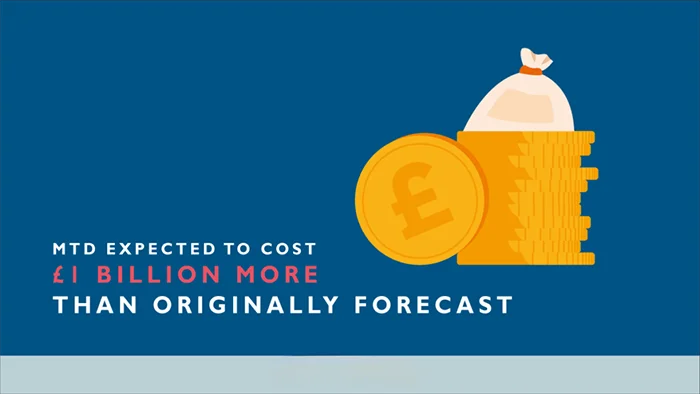
The thing is, most of the cost creep with Making Tax Digital is not the software price tag. It is the extra time spent sorting out unclear transactions, missing receipts, and “what was this for?” questions every quarter. If you want to keep costs sensible, aim for records that make sense to someone who is not you.
Start with separation. One business bank account and one business card, used for business spending only. It sounds basic because it is, but it is the fastest way to cut down back-and-forth. When personal and business are mixed, someone has to review each line and make a judgement call. That is usually you, your accountant, or both. Either way, it costs time.
Then put a simple routine in your diary. Weekly is ideal, fortnightly still works for most people. Set aside 15-30 minutes to categorise transactions and upload receipts. Categorising just means labelling what each payment was for, like materials, tools, rent, motor expenses, software, travel. It is much quicker when the transaction is fresh in your head, and it stops that horrible end-of-quarter scramble.
Use photo receipt capture as you go, not at year end. Most bookkeeping apps let you snap a receipt and attach it to the transaction. Even if you hate apps, taking a photo and saving it to a single “Receipts” folder on your phone is miles better than a shoebox. Receipts fade. They get lost. And you will not remember what that £23.80 was for three months later.
Have a clear agreement with your accountant upfront about who does what. For example, are you doing the day-to-day bookkeeping and they are reviewing and filing the quarterly updates? Or are you sending bank statements and they are doing the sorting? Both can work. The expensive option is the fuzzy middle where you do half the job, in a different way each time, and your accountant has to redo it to make it usable.
If you are using spreadsheets, keep them consistent. Same tabs, same headings, same format every quarter. Do not reinvent the sheet because you found a nicer template online. Accountants can work with spreadsheets, but only if they are steady and logical. A spreadsheet that changes shape every quarter is like moving the kitchen cupboards and expecting someone else to cook dinner quickly.
My judgement call: do not aim for perfect records. Aim for clear records. If each transaction has a sensible category, the receipts are there, and anything unusual has a short note, you are already doing better than most. That is usually enough to keep your software and accountant time from ballooning, without turning your life into admin.
Most MTD costs creep in when your records have to be converted, re-entered, or “fixed” to fit the software or your accountant’s process. So before you sign up to anything, ask the boring questions. They are only boring until you get charged for the second attempt.
First, check compatibility with how you actually earn money. If you are in construction and deal with CIS, ask if the setup handles CIS properly. CIS is the Construction Industry Scheme, where tax is deducted from subcontractors and you need to record those deductions accurately. If you are a landlord, ask how rental income and expenses will be tracked, especially if you have more than one property. If you do more than one trade, like an electrician who also sells tools online, ask whether the system can keep those income streams separate without you running two sets of books.
Then ask about workflow, in plain terms. Who is doing the day-to-day bookkeeping, you or the accountant? Who is checking it, and how often? And what exactly will be filed each quarter? “Bookkeeping” just means keeping your income and expenses up to date in a usable way. A lot of fee surprises come from a mismatch here, like you thought you were paying for filing, but the accountant thought you were doing the sorting and they were only reviewing it.
I would also ask what “review” means in practice. Is it a quick sense-check, or are they recoding transactions, asking questions, and chasing missing receipts? The more work hidden inside that word, the more likely your costs move around.
Support is the next one, especially near deadlines. If you get stuck two days before a quarterly update is due, what happens? Do you get a real person you can speak to, or is it email only? Is there a cut-off time for questions? And if your accountant is on holiday, who covers it? This is not being needy. It is just recognising that MTD is time-based. When something goes wrong, it tends to go wrong at the worst moment.
Finally, ask about data ownership and access. Can your accountant log in directly and see what you see, or do you have to export files and email them every time? If you decide to switch accountants later, can you give the new one access without starting from scratch? And if you change software, can you take your data with you in a sensible format, or does it turn into a mess of half-useful exports? You do not want to feel trapped because leaving means paying someone to rebuild a year of records.
A small judgement call from what we see in practice: pick the option that fits your routine, not the one with the longest feature list. If you know you will not keep up with weekly admin, choose a setup where your accountant can jump in and tidy quickly without a lot of back-and-forth. That usually costs less over the year than forcing yourself into a “perfect” system you never actually use.
If you are trying to price up Making Tax Digital (MTD), the hard bit is that the cost is not just “software”. It is usually three buckets: tools (software or spreadsheets), people (accountant or bookkeeper help), and your time. Your own habits matter more than most people expect.
Start by listing what you use right now, without judging it. Be honest. Is it a spreadsheet? A notes app? Your bank app? A folder of PDFs? A shoebox of receipts? Do you invoice properly, or is it “I will remember later”? This list is your baseline.
Next, write down what needs to change to support quarterly updates. A quarterly update is basically a summary of your business income and expenses sent to HMRC through compatible software. It only works smoothly if your records are kept up to date, and in categories that make sense.
So ask: what is missing from my current setup? Common answers are things like “I do not photograph receipts”, “cash spends are not tracked”, “I cannot tell which payments were business vs personal”, or “my spreadsheet has one big total and no categories”. If you are in construction, add CIS to the list. CIS is the Construction Industry Scheme, where tax is deducted from subcontractors and you need those deductions recorded correctly.
Once you have that, you can split your budget thinking into early-stage costs and ongoing costs. Early-stage costs are mainly setup and cleanup. That is things like choosing software, linking the bank feed, setting categories, migrating from spreadsheets, and fixing a backlog of messy months. Ongoing costs are smaller, but more frequent, because the work turns up every quarter whether you feel ready or not.
In practice, most people who feel MTD is “expensive” are really feeling the cleanup. You are paying to get the books into a state where quarterly reporting is even possible. Once that is done, it tends to settle into a routine, but you do need to keep it moving.
A simple way to test your likely cost is a one-month trial of doing your records “MTD style”. Pick a normal month, not your quietest month and not your worst month. For four weeks, do this: capture every receipt, record every sale, and categorise your spending as you go. If you use software, use it properly. If you use spreadsheets, keep them up to date weekly, not “end of the quarter”. Then see what breaks.
What usually breaks is not the technology. It is missing receipts, unclear categories, and gaps in the story. For example, you see a card payment to a builder’s merchant but you cannot remember what it was for. Or you have a Stripe payout from Etsy, but you have not separated fees, refunds, and delivery charges. Or your bank feed is full of mixed personal and business spending, so everything needs explaining.
That one-month trial gives you something useful: you can see whether you will be fine with low-touch software and a light accountant review, or whether you will need more hands-on bookkeeping support to keep quarterly updates painless. It is also a good way to spot which parts you can realistically do yourself, and which parts you always avoid until the last minute.
A small judgement call from what we see: if you are the kind of person who hates admin, budget for help rather than betting that you will change overnight. It is usually cheaper to pay for regular tidying than to pay for a rescue job four times a year.
One more thing that is easy to miss. Good records can pay you back, not by magic, but because you are less likely to forget allowable expenses. Allowable expenses are normal business costs you are permitted to deduct for tax, like certain tools, travel, software, or stock. If you keep receipts and notes as you go, fewer things get lost or left out. It does not guarantee a better outcome, but it does reduce the chance you quietly overpay because you cannot prove what you spent.
If you do the tool list, identify the changes needed for quarterly updates, and run a one-month trial, you will end up with a realistic range for your own situation. Not a made-up single number. And that is the point. It lets you plan without guessing, and without getting surprised later.
We often see the same pattern with Making Tax Digital costs – the software itself is not always the main issue. The cost creeps in when records are patchy and each quarter turns into a mini tidy-up. In practice, the simplest method that keeps fees and stress down is reconciling your bank feed weekly, while you still remember what that payment was for.
If you are trying to budget for MTD, assume there will be some extra cost at the start, even if you pick a low-cost or free software option. That is not doom and gloom, it is just how change works – once the new routine is in place and your records are consistent, the ongoing cost is usually more predictable and easier to control.
If all of this still feels a bit much, or you just want someone to look at your numbers and tell you straight whether you need to worry about it – that’s literally what we do.
We handle the whole Making Tax Digital process for self-employed people and landlords.
Registration with HMRC, setting up your records (QuickBooks or a spreadsheet – either works), quarterly submissions, the end of year stuff, all of it. You don’t need to learn the system yourself.
First chat is free, no obligation, and a real person picks up the phone.
Here are other posts you may want to read.