
Most people hear about Making Tax Digital (MTD) in bits and pieces. A message from HMRC here, a post on social media there, and suddenly it feels like you are meant to know what to do. The uncertainty is usually the stressful part, not the admin itself. So this is a practical FAQ with short questions and short answers, focused on the details people get stuck on: how the penalty points system works, who can be exempt and how you apply, the actual quarterly deadlines (dates, not just “every three months”), whether you can leave MTD if your income drops, what happens to the old Self Assessment tax return, and where partnerships fit in. We will keep it plain and calm. One small caveat – HMRC rules and start dates can change, and edge cases do exist, so if something here feels like it almost applies to you, it is worth checking the exact position for your situation.
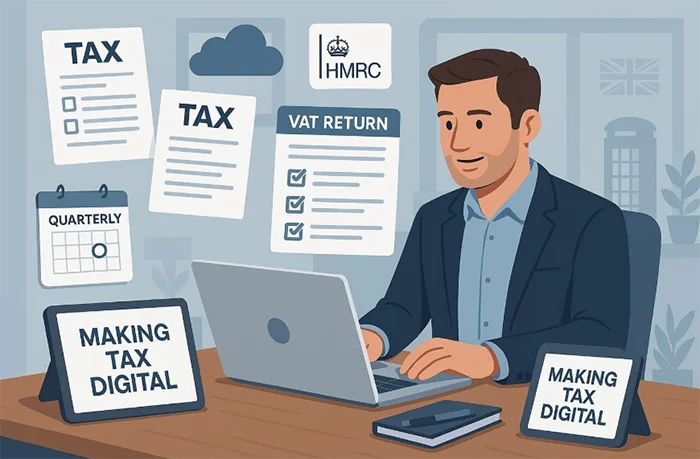
Not everyone has to join MTD at the same time. And some people will only ever deal with one part of it.
Basically, MTD is an HMRC programme to move tax reporting onto digital records and online submissions. It is not one single change, it is a few separate changes that happen at different times depending on the tax.
MTD for VAT is already live. If you are VAT registered and required to follow the MTD rules, you submit VAT Returns through MTD-compatible software (that can be bookkeeping software or a bridging tool that links spreadsheets to HMRC). Most VAT registered businesses have already bumped into this.
Then there is MTD for Income Tax. This is the one that affects sole traders and landlords, because it is about income tax on self-employment and property income. If you earn money from your own trade (say you are a plumber, consultant, Uber Eats driver, or you sell on Etsy) or you rent out property, this is the part you will be looking at when it applies to you.
The start date for MTD for Income Tax depends on your income level and the tax year. HMRC has been phasing it in, and the thresholds and timing matter, so it is worth checking the latest HMRC position rather than relying on something you saw in a post last year.
If you are not VAT registered and you only have PAYE income (a normal salary where tax is taken at source), you might not need to do anything right now. But if you have even a small side income from self-employment or property, it is sensible to keep an eye on it. In practice, being prepared early usually saves stress later, even if you are not yet required to join.

For the MTD for Income Tax entry test, HMRC is looking at income in the plain sense of what comes in before expenses. Think turnover, not profit.
Turnover is your sales (or your rents if you are a landlord). It is the money you receive for the work you do or the property you let. Profit is what is left after you take off your business costs like materials, fuel, software, insurance, MTD accountant fees, and so on.
This matters because a lot of people assume, “I do not earn much once I take expenses off, so I will be under the threshold.” In practice, HMRC cares about the bigger, before-expenses figure when deciding if you need to join.
Another common catch is having more than one income stream. If you have self-employment income and property rental income, those are normally looked at together for the relevant test. So your trade turnover plus your rental income can combine to push you into scope, even if each one on its own feels small.
A simple example. Say you are a tradesperson and you invoice customers through the year. You also have one small rental property that brings in rent each month. Even if your trade does not feel “big” and the rental is just a bit of extra money, the combined total of those before-expenses amounts is what can tip you over the line for MTD for Income Tax.
If you are not sure what your “income” is for this test, a practical rule is: look at your total invoices and takings for the year, and add your gross rents. Do not subtract your costs. If that combined figure is getting close to the relevant threshold, it is worth setting up your records as if you are joining anyway. It is usually less painful than doing a last minute scramble because you were only watching the profit number.
Yes, there is still an end-of-year step. The big change is that HMRC wants you to send in quarterly updates during the year, but that does not replace the annual process of finalising your figures.
The key thing to understand is this: the quarterly updates are not four tax bills. They are updates. Think of them as “here’s what my income and expenses look like so far”, based on the records you have at that point.
In practice, those quarterly numbers can be a bit rough around the edges. Maybe you have a couple of receipts missing. Maybe a customer pays late and it lands in a different quarter than you expected. That is normal. The quarterly updates are mainly about keeping your records moving and giving HMRC a running picture.
Then there is the year-end step, where you confirm the final figures and lock in your tax position for the year. Under MTD you might hear this called “finalisation”. In plain English, it just means you are telling HMRC: these are the final, correct totals for the tax year, and this is what I am claiming.
This year-end bit is where a lot of the important tax work usually happens. For example, capital allowances (tax relief on certain equipment, like tools, vans, computers, or other kit you buy for the business) are often sorted properly at the end of the year once you can see everything you bought and what qualifies. The same goes for adjustments that are hard to do quarter by quarter, and a sensible “does this expense really belong to the business?” review.
It is also when you normally deal with things like reliefs and other personal tax details that do not fit neatly into a quarterly running total. Basically, the quarterly updates keep the books warm, and the year-end finalisation is when you make it accurate.
One practical tip: treat the quarterly updates as a habit-building exercise, not a perfection test. Keep your sales and main costs up to date, and save anything fiddly for the year-end review. That is usually the most realistic way to stay compliant without letting tax admin take over your life.
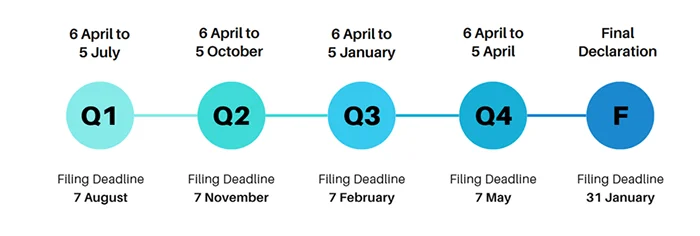
For Making Tax Digital for Income Tax, HMRC works on tax year quarters. The standard pattern most people use looks like this:
Quarter 1 runs 6 April to 5 July. Quarter 2 runs 6 July to 5 October. Quarter 3 runs 6 October to 5 January. Quarter 4 runs 6 January to 5 April.
Your quarterly update (that’s the online submission of your income and expenses for that period) is due one month after the quarter end.
So, based on that standard cycle, the usual deadlines are 5 August for the quarter ending 5 July, 5 November for the quarter ending 5 October, 5 February for the quarter ending 5 January, and 5 May for the quarter ending 5 April.
One small judgement call from real life: don’t aim for the 5th if you can avoid it. Give yourself a few days’ buffer. People always end up hunting for one missing receipt, or waiting for a bank feed to catch up, and it is rarely worth the stress.
A quick caveat, because there can be exceptions. Some people may be able to use different “periods” under HMRC rules or options, so the dates above are not universal for everyone. Before you put them in the diary, check what quarters your software is set to, and make sure they match what you have chosen with HMRC.
HMRC’s newer late submission setup works on points for many taxpayers. In plain English, missing a submission deadline usually gets you a point, rather than an immediate fine every single time. That matters, because it turns the system into a “pattern of lateness” test, not a one-off mistake punishment.
Once you reach the points threshold for the type of filing you are on, HMRC can charge a financial penalty. After that, if you keep missing deadlines, you can keep getting penalties as well as points. It is a bit like: you have used up your free warnings, now the meter starts running.
The other thing to know is that points are not always forever. They can expire or be reset, but only after a period of compliance. The exact rules depend on how often you are required to submit. Quarterly filers are treated differently to people who only file annually, because there are more chances to miss deadlines.
A quick example. Say you are on quarterly updates for MTD for Income Tax and you miss two update deadlines. You would normally pick up two points. The practical risk is not that you automatically get fined for those two late updates, but that you are now closer to the threshold. One more slip later in the year could be the one that triggers a penalty.
My honest judgement call: if you have missed one deadline, do not try to “catch up perfectly” all at once. Just get the next one in on time and keep it steady for a while. The points system is designed to reward consistent compliance, even if your bookkeeping is not museum-quality every quarter.

You can appeal a late submission point. In practice, HMRC will usually only remove it if you had what they call a reasonable excuse. That just means a genuine, unavoidable reason you could not meet the deadline, and you acted as soon as you could afterwards.
Reasonable excuse tends to be things like serious illness, a hospital stay, bereavement, or something genuinely unexpected that stopped you filing. IT problems can count too, but only when they are real-world problems you can evidence. For example, an HMRC service outage message, your software showing errors, or a failed submission with a time stamp.
What usually does not work is “I didn’t know” or “I didn’t realise the deadline.” HMRC generally sees deadlines as your responsibility, even if this is your first year doing it and it feels like a lot.
If you do need to appeal, treat it like you are writing a short, calm timeline. What happened. When it happened. What you did to try to fix it. When you filed in the end. Keep it factual.
Practical stuff that helps: take screenshots of error messages, keep the dates and times, and note down any reference numbers (submission receipt numbers, software ticket numbers, HMRC webchat references). If you spoke to HMRC, write down the date, time, and the name or ID of the person if you have it. It sounds a bit over the top, but it makes the difference between “I had a problem” and “here is the proof”.
Appeal promptly. Don’t leave it for weeks and hope it disappears. The longer you wait, the harder it is to show you took reasonable steps.
One small judgement call from experience: don’t appeal every point on principle. If you were simply late and there is no solid reason, it can turn into time and stress for very little gain. Save appeals for the ones that are genuinely unfair or unavoidable, and put your energy into getting the next submission in on time.
In most cases, one late submission does not mean an instant fine hitting your bank account the next day. Under Making Tax Digital, HMRC generally adds a late submission point first. A point is basically a strike on your record, not a bill.
The actual money penalty usually only happens once you build up enough points to reach the penalty threshold. That is the line where HMRC switches from “we are tracking this” to “now you owe a fixed penalty”. So the first late filing tends to be a warning sign. The risk is what happens if it becomes a pattern.
One important thing people mix up: submission penalties are about filing on time. They are separate from paying on time. If you owe tax and you pay late, HMRC can charge late payment penalties and interest. Interest is just the extra amount for paying late. That can apply even if your submissions are perfect.
Practical tip from real life: if you are running late, submit something rather than waiting for perfect numbers. If your bookkeeping is behind and you are guessing a bit, get the update in and then tidy it up afterwards if corrections are allowed through your software or in the next submission. Waiting an extra two weeks to “get it right” often just turns one problem into two problems.
My judgement call: if you have already slipped once, treat the next deadline like the priority, even if the figures are not pretty. HMRC’s system rewards getting back on track. Trying to rebuild the whole year’s bookkeeping before you file again is where people lose another month and end up with more points.
This is a common one. Your turnover drops, cash is tight, and the last thing you want is more admin. The thing is, falling under the MTD threshold does not normally remove you from MTD automatically. In most setups, once you are in, you stay in until HMRC agrees you can stop, or the rules say you can stop from a particular point.
MTD is basically the system where you keep digital records and send updates through compatible software. It is not the old “do one tax return at the end and forget about it” approach. So HMRC tends to treat it as an ongoing way of reporting, not something you dip in and out of because one year was slow.
In practice, if your income drops, you may need to apply to leave, or you may need to wait until you meet specific conditions and HMRC lets you stop from a future tax year. It depends on what you are registered for, and why your turnover dropped. Some changes count, some do not. And HMRC can be picky about dates.
Example we see a lot: a builder has a quiet year. Maybe a long gap between jobs, maybe illness, maybe they took time off. Their turnover falls below the threshold and they ask, “Can I go back to the old way and just do Self Assessment once a year?” Possibly, but not instantly. Usually the right first step is to check whether HMRC will treat the drop as something that lets you deregister, and if so, from when. Otherwise you can end up missing submissions while you assume you are “out”. That is when penalty points start appearing.
Practical advice: do not stop filing MTD updates just because your bank account had a bad year. Keep submitting until you have confirmation from HMRC (or your agent has it) that you have left MTD, and from what date. Keep that message or letter. If it is a phone call, note the date and time and who you spoke to.
Small judgement call from experience: if you expect the drop is temporary, it is often less hassle to stay on MTD and keep the routine going, even if the numbers are smaller. Leaving and rejoining later can create more admin than it saves, and it increases the chance something gets missed.
Yes, exemptions exist. But for most people they are not automatic. In practice, you normally have to apply and explain why you cannot meet the digital record keeping and digital submission rules.
MTD (Making Tax Digital) means keeping your business records in a digital form and sending updates to HMRC through compatible software. It is not just “emailing a spreadsheet”. HMRC is looking for a sensible reason why you cannot do that, rather than why you would prefer not to.
The main exemption route people ask about is digital exclusion. That is HMRC’s way of saying you cannot use digital tools in a realistic way. The common examples are disability, very old age where using software is genuinely not possible, or living somewhere with unreliable internet access. Sometimes it is a mix of things, like eyesight issues plus no broadband. What matters is the practical impact, and whether there is a reasonable way around it.
To be clear, “I’m not good with computers” is not the same thing as being digitally excluded. Lots of people feel nervous about bookkeeping software. HMRC usually expects you to get help from a family member, friend, or an agent, or use simpler tools, rather than opt out completely.
Religious grounds can also be a route to exemption. This tends to come up where a person’s beliefs prevent them from using certain technology or methods of keeping records. Again, it is not normally automatic. You would usually need to explain the position and show it is a genuine barrier to complying with MTD requirements.
There are also special cases like insolvency. If you are insolvent (basically, you cannot pay your debts as they fall due, and there is a formal process going on), your tax affairs can change quickly and the normal filing routine may not fit neatly. HMRC has separate handling for some of these situations, and sometimes MTD obligations are paused or dealt with differently depending on what stage you are at.
Practical advice: if you think you might qualify, do not just stop filing. Keep submitting until you have HMRC confirmation that an exemption is in place, and from what date. If you apply, keep a copy of what you sent and anything HMRC replies with. If you speak to HMRC by phone, note the date, time, and what was agreed.
My small judgement call: if the real issue is confidence rather than ability, it is usually easier to set up a simple process and get support than it is to try to argue an exemption. An exemption can be the right answer for some people, but HMRC will usually want a clear, practical reason.
In most cases, an MTD exemption is not automatic. You usually need to contact HMRC and explain why you cannot meet the digital record keeping and digital submission rules. That normally means spelling out why using digital tools is not realistic for you, not just inconvenient.
Before you get in touch, it helps to prepare three things. First, a short written explanation in plain English. A few sentences is fine, as long as it is specific. For example: what stops you from using software, what you have tried, and why it still does not work in practice.
Second, gather supporting evidence where it makes sense. That could be something like a note that supports a disability or health condition, or anything that backs up the practical problem you are facing (for example, access issues that are ongoing rather than a one-off). You do not need to write your life story. Just enough to support what you are saying.
Third, have your basic details and circumstances ready. Which tax you are affected by, what type of business you are (sole trader, landlord, partnership), and what the actual barrier is. If you have an MTD accountant acting for you, you can also ask them to help present the request clearly.
After you apply, HMRC will make a decision and confirm it to you. While you are waiting, assume the normal rules still apply. Keep your records as neatly as you can and try to meet deadlines in the usual way. If you cannot comply fully because of the same issue you are applying about, keep notes of what you did instead and why. That paper trail can matter later.
One small judgement call from experience: the clearer and more practical your explanation is, the smoother it tends to go. Vague reasons tend to bounce back with questions. A calm, specific “this is the problem, this is why it cannot be solved” usually lands better.
A partnership, in plain terms, is two or more people running a business together and sharing the profit. You might have a joint name on the van, shared customers, and you split what is left after costs. That is the basic idea.
The thing that catches people out is that partnership reporting is not the same as being a sole trader. A sole trader has one set of business records and one tax return. A partnership has its own partnership tax return (a separate return for the business), and then each partner has their own personal tax return as well.
That is why MTD can feel messy for partnerships. The MTD rules and start dates can be phased differently for different types of taxpayers, and partnerships are often treated on a different timetable to individuals. So you cannot safely assume your partnership starts MTD at the same time as your mate who is a sole trader, even if your turnover is similar.
In practice, think of it like this. The partnership return reports the partnership’s overall figures. Total income, total costs, and how the profit is shared between partners. Then each partner reports their own share on their personal tax return, along with anything else they have going on, like a second job, a rental property, or dividends.
A quick example helps. Two tradespeople working together, quoting as a pair, buying materials from the same pot, and splitting profits 50-50 is usually a partnership in the normal sense. One subcontractor working for another, getting paid a day rate, and not sharing profits is usually not a partnership. That second one is more like a contractor relationship, even if you work side by side for months.
Practical advice: if you are unsure whether you are actually in a partnership, check what happens in real life, not what you call it in conversation. Who invoices the customer. Whose bank account the money lands in. Who pays the costs. Whether you share profits and losses. Those details matter more than the label.
One small judgement call from experience: if you are operating like a partnership but you have never formalised it, it is worth getting clarity sooner rather than later. Not because HMRC loves paperwork, but because MTD and deadlines are easier when everyone knows what is being filed, by who, and when.
Most joint-owner landlords are surprised by this one. Even if the rent goes into one bank account and one person does all the admin, each owner usually reports their share of the rental income and their share of the allowable expenses on their own tax return.
So, there is not normally one “combined” rental section you file as a couple. It is split between you. If you are thinking about Making Tax Digital for Income Tax, it follows the same logic. The reporting is linked to the person, not the property.
In practice, the part that matters is record-keeping. You can absolutely have one person doing the bookkeeping, uploading receipts, and speaking to the personal accountant. Plenty of couples do that. But the records still need to make it clear what the total rent was, what the total costs were, and how you split them between the two of you. Otherwise it turns into guesswork later, usually right when a deadline is looming.
A quick example. You own a flat 50:50 and rent is £1,200 a month. Over the year that is £14,400. You paid £1,000 for repairs and £300 for insurance. In practice, you would normally each report £7,200 of rent, and each claim £500 of repairs and £150 of insurance, assuming those costs relate to the whole property and you split them in the same ratio.
One small judgement call from experience: pick one simple system and stick to it. A shared folder for invoices, a spreadsheet with dates and amounts, and a note of the ownership split sounds boring, but it saves arguments and it saves tax return time. If your ownership split is not the straightforward 50:50 people expect, get advice before you file. Unusual arrangements exist, but you do not want to guess.

The key requirement under Making Tax Digital is not “buy this app”. It is digital record-keeping and a digital submission to HMRC. There are a few ways to get there, and the best one is usually the one you will actually keep up with.
Spreadsheets can still be part of the picture. Lots of people are comfortable with them, especially if your business is straightforward. The catch is that HMRC generally expects the figures to be sent through software, so a spreadsheet on its own is not normally enough for the submission part.
That is where bridging software comes in. Bridging software is basically a tool that takes totals from your spreadsheet and submits them digitally to HMRC. It can be a decent “middle step” if you are not ready for full bookkeeping software, or if you have been using spreadsheets for years and they already work for you.
In practice, choosing what to use depends on what else is going on in your business. If you are VAT registered, you have more frequent reporting and more rules around the VAT return, so a more structured setup often saves stress. If you have employees, you will also have payroll (that is the system for paying staff and reporting to HMRC), which pushes you towards software that keeps things tidy. If you hold stock, you may want something that tracks what you buy and sell, otherwise your numbers drift. And if you are in construction under CIS, you may need to track CIS deductions and who you have paid. CIS is the Construction Industry Scheme where contractors take tax off subcontractor payments.
One small judgement call from experience: if your records are already messy, switching to a fresh spreadsheet template rarely fixes that. It just moves the mess into a new file. Sometimes it is better to pick a simple bookkeeping system and stick with it, even if it feels like a change at the start. But if you are genuinely consistent with your spreadsheet, and you only have a handful of transactions a month, bridging can be a sensible option.

MTD talks about “digital records”, but in practice it is just tidy bookkeeping. You need to capture your sales or income, your business expenses, and the dates and amounts for each. Then your totals can be summarised for the quarterly updates and the year-end final submission.
For income, that usually means invoices you raise, till totals, bank card receipts, online sales reports (Shopify, Etsy, Amazon, Uber Eats, Airbnb, Fiverr), and any cash takings. The key bits are the date, the amount, and a short description that will still make sense in six months. If you are VAT registered, you also need to keep enough detail to work out the VAT correctly.
For expenses, keep the same basics: date, amount, supplier, and what it was for. Keep the proof too. That can be a photo of a receipt, a PDF invoice, or an email confirmation. You do not need a novel, but “Tools” is better than “Stuff”, and “Van fuel” is better than “Card payment”.
If you are a landlord, treat the property like a mini business. Record rent received (date and amount) and track the normal allowable costs in plain terms: letting agent fees, repairs and maintenance, insurance, safety certificates, and similar running costs. Also note what the cost relates to, especially if you own more than one property, because mixing them up is one of the easiest ways to end up with the wrong totals.
If you work in construction and CIS applies, you need a bit more care. CIS is the Construction Industry Scheme, basically construction tax deducted at source. If you are a subcontractor, track your gross payments, the CIS tax deducted, and keep the monthly CIS statements from contractors. If you are a contractor paying subcontractors, you need records of who you paid, what you paid, and what you deducted, plus the verification and the statements you issue.
One small judgement call from experience: pick one place where the numbers “live” and stick to it. That might be bookkeeping software, or a spreadsheet feeding into bridging software. What causes problems is splitting it across a notebook, three bank accounts, WhatsApp screenshots, and a shoe box of receipts, then trying to rebuild it at quarter end.

It happens. You miss a receipt, put something in the wrong category, or count a payment twice. The important bit is this: a quarterly update is not the final word on your tax for the year. It’s an in-year snapshot of your income and costs.
In practice, most small errors get corrected in a later quarterly update or at the year-end finalisation, depending on the software and how the figures flow through. The year-end submission is where you lock in the final numbers and tell HMRC what the actual profit was for the whole tax year.
What helps (a lot) is keeping a quick note of what changed and why. Nothing fancy. A short line like “Found missing Screwfix receipt from May” or “Duplicate invoice removed” is usually enough. If we ever need to explain the numbers, those notes save time and stress.
Example: you’re a plumber and you do your quarterly update, then a week later you find a receipt for a tool you bought for £85. You add it into your records with the right date and a clear description (for example “Pipe cutter”). Your next update or the year-end figures will then pick it up, so the full-year totals reflect the expense.
One small judgement call from experience: if you spot a mistake, don’t keep “fixing” it in your head. Put it into the records while you still remember what it was. Waiting until the end of the year is how small gaps turn into an afternoon of digging through bank statements.
Most of the confusion we hear comes from one assumption: “If I report quarterly, I must pay quarterly.” In practice, Making Tax Digital (MTD) is mainly about record-keeping and reporting. Payment dates are a separate issue.
Quarterly updates are just that – updates. They feed HMRC a picture of how your year is going so far. They are not the same thing as a tax bill.
What you may see, though, is an estimated tax figure in your HMRC account based on those updates. Useful, but it is still an estimate. It does not necessarily change the legal due dates for when tax has to be paid.
Think of it like this. Your bookkeeping is the running scoreboard. The final whistle is still the year-end submission, and that is what locks in the actual profit for the year. Any payments you make are then based on the rules for payment due dates, not on how often you updated the scoreboard.
That said, those HMRC estimates can be handy for budgeting. If you are a sole trader, landlord, or have a side hustle, it is often the first time you have a running view of what your tax might look like. Even if the payment date does not change, the estimate is a nudge to set money aside.
A practical approach that works for a lot of clients is to put aside a percentage of income into a separate savings pot after you get paid. Keep it boring. Keep it automatic. It is much easier than trying to find a lump sum later.
One small judgement call from experience: don’t treat the estimate as exact, especially if your income is seasonal or you have big costs that land later in the year. Use it as a guide for cash planning, then review it each quarter and adjust what you set aside.
Yes, you can start part way through the tax year. You can also stop. It happens all the time. MTD does not expect a perfect 12-month story, it just wants you to report what actually happened in the periods where you had self-employed income or rental income.
In practice, you still report for the quarters that cover the time you traded or received income. If you did not trade in a quarter, there is usually nothing meaningful to send for that bit. But any quarter that includes your start date, or any invoices, sales, fees, or rent coming in, needs to be reflected in your records and updates.
If you stop trading, that does not wipe the slate clean. You still need to finalise the year properly. That means making sure all income and expenses up to the stop date are in the records, and then doing the end-of-year submission so HMRC has the full-year totals. Think of it as closing the file neatly rather than leaving it half done.
Example 1: you start an Etsy shop in November. You only made a few sales before Christmas. You still keep digital records from when you started, and you report for the quarter that includes November and December activity. Your earlier quarters in the tax year are basically irrelevant because you were not trading then.
Example 2: you are a taxi driver and you stop in January because you take a PAYE job. You still report for the quarters that include the months you drove and earned. Then you still do the year-end submission to tie it all together, even if your last few months of the tax year had no taxi income at all.
One small judgement call from experience: when you stop, do not rush the final update on a bad memory. Take an extra hour to check your last month or two of bank transactions, card fees, fuel, and any platform statements. Most “missing bits” happen right at the end, when people are tired of the whole thing.
If you are unsure which quarters you need to submit for, the simplest way to think about it is dates. When did you start getting paid, and when did it properly stop. Work from there and keep the records tidy. It saves a lot of back and forth later.

Look, HMRC may receive some information from third parties. That might include bits of income data in some cases. But it is not your full story.
Your tax is worked out from your profit, not just what came into the bank. Profit is income minus allowable expenses. Allowable expenses are the business costs you are allowed to deduct, like stock, tools, software, mileage, and so on.
And the context matters. A bank transaction rarely tells HMRC what something was for. Was that payment “materials for a job”, “fuel”, “a laptop”, or “something personal you accidentally put through the business account”? The category changes the tax answer.
A simple example we see all the time: a plumber. The bank shows payments from customers, so yes, you can see money coming in. But the materials from Screwfix, the van costs, insurance, tools, parking, and fuel are not visible to HMRC as “business expenses” unless you record and report them properly. If you do not, the system can only ever assume a bigger profit than you actually made.
MTD is basically HMRC asking for your own set of digital records, updated through the year, so the figures are based on your real income and your real costs. Not guesses. Not half a bank statement.
Practical advice: keep one clean habit. When money goes out, write a quick note against it in your bookkeeping app while you still remember what it was. “Copper pipe for Job 24”, “van service”, “website hosting”. It takes seconds and it saves hours later.
One small judgement call from experience: if a transaction is mixed personal and business, do not force it into a single category just to make it “fit”. Split it, or keep it out and ask. Those are the ones that cause the silly mistakes.
We often see the same pattern with MTD questions – people are doing the work, but they are worried they are doing it in the wrong order, or that one slip will snowball. A common problem is leaving it all until the deadline week, then realising the records are missing context. In practice, the simplest habit is to keep a short note on each transaction so it is obvious what it was for.
If you are unsure about a rule, a deadline, or where you sit with exemptions, the calm judgement call is this: focus on getting the records right and consistent, then treat the quarterly updates as exactly that – updates, not a final verdict on your tax bill. It keeps stress down, and it makes the year-end submission much cleaner when it actually matters.
If all of this still feels a bit much, or you just want someone to look at your numbers and tell you straight whether you need to worry about it – that’s literally what we do.
We handle the whole Making Tax Digital process for self-employed people and landlords.
Registration with HMRC, setting up your records (QuickBooks or a spreadsheet – either works), quarterly submissions, the end of year stuff, all of it. You don’t need to learn the system yourself.
First chat is free, no obligation, and a real person picks up the phone.
Here are other posts you may want to read.