

Making Tax Digital (MTD) is happening. If you leave it until the last minute, it will feel messy. If you do a few small jobs in the right order, it is honestly fine. This guide is the practical version. No theory, no tax policy, no jargon for the sake of it. Just the steps you actually need to take, in a sensible sequence. You can run through it in one sitting, then come back later and use it as a timeline.
The first thing is knowing which phase you are in. That comes down to your 2024/25 gross income – basically your total sales or rents before expenses. Get that number clear and a lot of the next decisions become obvious, like when you need to start, which software is worth looking at, and whether you should change how you keep records. We will start there, then move on to software (including what to look for in Xero or QuickBooks), getting your paperwork digital, signing up on GOV.UK, and what to do if your accountant is handling the HMRC side.
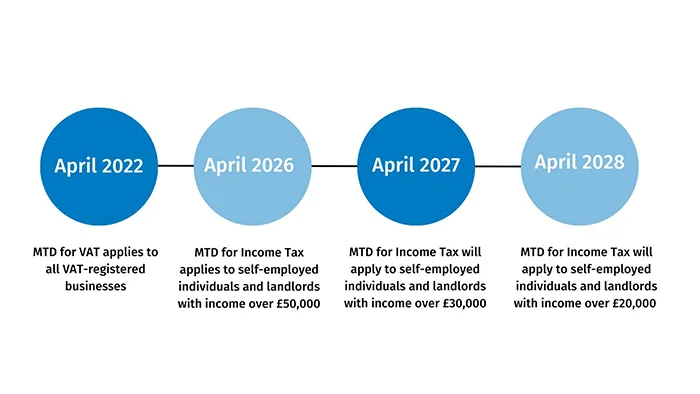
The thing that clears up most MTD confusion is working out your 2024/25 gross income. Not your profit. Not a guess based on how this year feels. The total money that came in during the tax year.
In this context, gross income just means income before expenses. So before you deduct materials, fuel, tools, accountant fees, or anything else. If you are a landlord, it is the rent you received before repairs and agent fees. If you are a sole trader, it is your sales and takings before costs. Simple as that.
A few real-life examples, because this is where people trip up. A sole trader plumber should look at the total amount customers paid them in 2024/25, even if half of it went straight back out on parts. A CIS subcontractor (Construction Industry Scheme – where tax is taken off your invoices by the contractor) should use the full invoice amounts, not the amount that hit their bank after deductions. Someone with an Etsy side income should use the total sales receipts, not what is left after Etsy fees and postage. A landlord should use the total rents received, even if the mortgage interest and repairs were painful.
How do you find the number quickly? The fastest place is usually your last Self Assessment tax return for 2024/25, if you have already prepared it or have a draft. Look for the turnover or total income figure for the relevant section (self-employment, property, partnership, etc.). If you do bookkeeping, your software should be able to give you a sales total for the year, and that is often close enough for this step as long as it covers the full tax year. If you are still on spreadsheets, add up your invoices or receipts for the year. If you are really stuck, bank statements can work as a back-up, but you need to be careful because they can include transfers, loans, and personal money moving around.
Please do not use profit as a shortcut. I see this all the time. Someone says, “I only made £X”, but their sales were much higher, and it is the sales figure that decides which MTD phase you are in.
If you are near the relevant threshold for your type of income, treat this as urgent. Not panic, just urgency. In practice, being close means you want your numbers clean and you want a plan, because a small late invoice, a good month, or a catch-up banked payment can push you over without you noticing.
Once you have your 2024/25 gross income written down in one place, keep it handy. It is the number you will use for the next steps, like choosing software and working out when you need to be ready.

MTD adds more moving parts. The easiest way to reduce stress is to decide, up front, who is responsible for what. Not in a vague “we’ll sort it” way. In a written list you can both refer back to when life gets busy.
In practice you have three workable options.
Option 1 is fully DIY. You choose the software, keep your records, and submit your updates to HMRC yourself. This can work if your business is simple and you are comfortable doing regular admin. The judgement call here is time, not intelligence. If you already struggle to keep up with invoices and receipts, DIY usually becomes a last-minute scramble.
Option 2 is accountant-led. Your accountant sets up the software, keeps the bookkeeping (or tidies it), and submits what needs to be submitted. You still feed them the raw information. You are not handing over a magic box that runs itself.
Option 3 is shared, which is what we see most with small businesses. You do the day-to-day record keeping in software. Your accountant checks things, fixes the annoying bits like miscategorised transactions, and then submits the MTD updates and the end of year figures. It is a good balance if you want control but also want someone to catch mistakes before they become a problem.
Even if you have an accountant, there are a few things you still need to do. You need to keep records as you go, not six months later. You need to get information over on time, especially bank feeds, invoices, and anything paid in cash. And you need to approve submissions when asked. Approval matters because HMRC sees it as your tax, your responsibility, even if someone else pressed the button.
If you want to make your accountant’s life easier, give them clean access and a routine. Bank access is the big one. That can be view-only online banking access, or a proper bank feed into the bookkeeping software, which pulls transactions in automatically. Then pick a regular upload habit for paperwork, weekly is ideal, monthly is the bare minimum. And keep receipts in one place, one app or one folder, not a mix of WhatsApp photos, emails, and a shoebox in the van.
Things to ask your accountant this week, before you choose software or start moving records around. Are you set up for the MTD version that applies to me and is my current software compatible. If they suggest Xero or QuickBooks, ask which one they prefer to support and why, because support matters more than features you will never use. What is your process, step by step, and what do you need from me each month or quarter. What are your deadlines, meaning when do you need my info by, not the HMRC deadline. What are the fees, and what is included versus extra. And who is doing the sign-up on GOV.UK, you or them, because the sign-up is a specific action and someone needs to own it.
If you have never used an accountant before, start simple. Find someone who deals with your type of work, like CIS subcontractors, landlords, or small retail, and ask how they handle bookkeeping and filings in plain English. Bring your last tax return if you have one, and a rough idea of your income and expenses. You do not need perfect records to have the first conversation. You just need to be honest about what you have and how you currently keep it.

MTD-compatible, in plain English, means two things. The software can keep your records digitally, and it can send updates to HMRC through approved connections. If it cannot do both, it is not the right tool for MTD, even if it is great at spreadsheets or invoicing.
Look, the software does not need to be fancy. It needs to be usable when you are busy. If you hate logging in, you will avoid it, and then everything becomes a weekend panic.
Start with bank feeds. A bank feed pulls your bank transactions into the software automatically. For most small businesses, that is the difference between keeping up and falling behind. If the bank feed is unreliable, or your bank is not supported, that is a real problem.
Next, receipt capture. You want a quick way to snap a photo of a receipt and attach it to the right transaction. This matters for people who buy materials, tools, fuel, or stock in bits and pieces. It also matters for anyone who travels for work and ends up with a stack of train tickets and coffee receipts.
Then invoicing. Even if you only send a few invoices a month, you want it to be easy. Clean invoice templates, clear payment tracking, and ideally a way to match customer payments coming into the bank. If you are a contractor or subbie, you also want to be able to mark income properly, especially if CIS is involved (CIS is the construction scheme where tax is taken off your invoices before you get paid).
Categories matter more than people think. Categories are just the labels for your income and expenses, like materials, motor, rent, phone, advertising. If the list is confusing, or you cannot add sensible ones, you will end up coding everything to “other”. That makes your figures messy and your tax return harder than it needs to be.
Reports are worth checking early. You are looking for simple ones: profit and loss, income by month, and a list of what you have spent by category. For landlords, you want rental income and expenses that make sense for property. For a VAT-registered retailer, you need VAT reports that you can actually follow, because VAT errors can get expensive.
Mobile use is another big one. If you do admin on the go, test the app properly. Can you raise an invoice, attach a receipt, and check what has come in, without wanting to throw your phone across the room. In practice, if the mobile side is clunky, people stop keeping records until “later”. Later usually means never.
If you have more than one income stream, be honest about it upfront. A lot of people do. Maybe you are a plumber with some rental income. Or you sell on Etsy and also do Uber Eats at weekends. Check the software can separate things clearly, so you can see what is earning money and what is just noise.
Also check user access for your accountant. You want to be able to invite them in with the right permissions, so they can review, tidy up, and submit what needs submitting. Emailing spreadsheets back and forth is where mistakes breed. Shared access is calmer.
Xero and QuickBooks are two common options we see a lot. Both can work well, but the best choice depends on what you do and how you run things. A simple landlord with one property and no VAT needs something straightforward. A VAT-registered retailer with regular stock purchases needs stronger day-to-day bookkeeping and clean VAT handling. If you already have an accountant, ask which one they support most comfortably, because support beats fancy features.
A gentle warning on cheap or free tools. Some are fine for tracking money, but they cannot file to HMRC, or they do not meet the digital record requirement properly. Others can connect, but only through awkward workarounds that fall apart when HMRC changes something. If you are unsure, check before you commit, not after you have loaded a year of data into it.
The best practical test is to try it for a week. Pick one software, connect one bank account, and categorise one month of transactions. Add a couple of receipts and, if you invoice, send one test invoice to yourself. If it clicks, you will know. If it feels like hard work straight away, it will not get easier in the middle of a busy month.
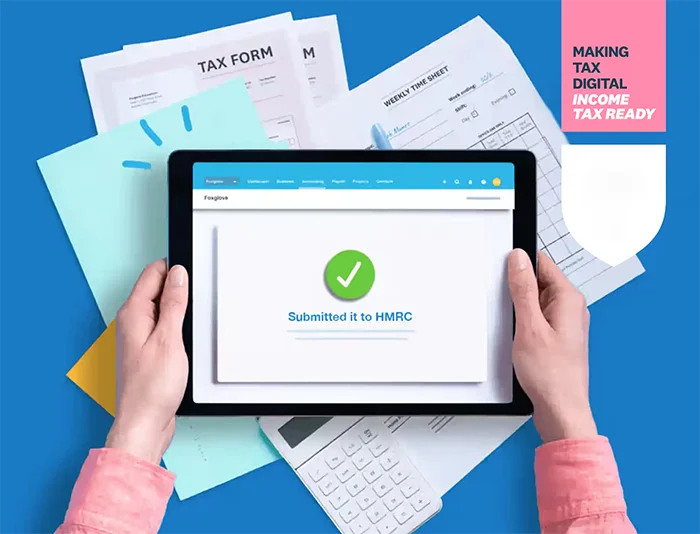
When people hear “digital records”, they picture hours of admin and a colour-coded spreadsheet. In practice, it just means your numbers and your proof are saved in a way you can find, check, and share.
At a basic level, you need four things: your sales or income, your business costs, the proof for both (receipts and invoices), and your bank transactions. That is it. If those four are covered, the rest is tidying.
Your bank transactions matter because they act like the spine of your records. They show what actually went in and out. Then you attach the “why” to each one, so you are not guessing later when it is tax return time.
If you are starting from paper, do not try to backfill years in a weekend. Pick a start date and go forward properly. Then catch up bit by bit. To be honest, that approach is what actually sticks for busy people.
Here is a workable way to move from paper to digital without making it your whole personality.
First, receipts. Use your phone. Take a photo as soon as you can, while the receipt is still readable and you still remember what it was for. If your bookkeeping software has receipt capture, use it. If not, a simple folder on your phone or Google Drive works fine, as long as you are consistent.
Second, invoices and bills that arrive by email. Make one dedicated folder in your email, like “Tax – 2024/25”. Then get into the habit of moving anything business-related into it. Supplier invoices, platform statements, insurance docs, everything. One folder beats searching your whole inbox at deadline time.
Third, basic naming. This sounds small, but it saves hours. If you save files, use a simple pattern like “2024-08-14 Screwfix tools £38.50” or “2024-09 Airbnb statement”. Dates first, then supplier, then what it is, then amount if it helps. You do not need to overthink it. You just need to be able to find things quickly.
Now the routine. This is the minimum viable process we see work for real humans.
Weekly: 15 minutes. Open your bank feed or bank app. Look at the last week. Categorise what you can. Attach any receipts you have. If something is unclear, add a quick note like “materials for job on King’s Road” or “fuel for deliveries”. Then stop.
Monthly: 60 minutes. Reconcile the whole month. That just means making sure every bank transaction has a category and, where you should have proof, you can find it. Upload the leftover receipts from your wallet, screenshot any platform summaries, and check you have not missed cash takings or tips if you get them.
If you only do one thing, do the weekly 15 minutes. It keeps the pile small. The monthly hour is where you catch the stuff that slips through.
If you drive for Uber Eats, your fuel and phone costs are usually the big ones. Fuel receipts are easy to lose, so photograph them straight away. For your phone, keep the monthly bill PDF. If you use the phone for personal use too, flag it for your accountant so you claim it in a sensible way rather than guessing.
If you are a construction subcontractor, tools and materials come up all the time. Screwfix, Toolstation, builders’ merchants. Those little receipts add up. Take photos. Also track mileage if you drive to sites. A simple note on your phone works, as long as you record the date, where you went, and the miles. If you do CIS (Construction Industry Scheme, where tax is taken off your invoices), keep your CIS statements too. They are part of the proof of what has already been deducted.
If you are a landlord, keep invoices for repairs and maintenance, and keep anything to do with big works. The key practical point is this: some things are repairs, some are improvements, and the tax treatment can be different. Do not stress about deciding on the spot. Just save the invoice and add a note like “new boiler” or “kitchen upgrade” and ask your accountant if you are unsure.
If you sell on Etsy, the fees and postage are where people miss expenses. Download your Etsy statements or monthly summaries and save them to your folder. Keep proof of postage and packaging costs. If you buy materials in small batches, those receipts go missing fast, so photo them as soon as you leave the shop.
Why all this matters is simple. It reduces errors because you are not relying on memory. It stops missing expenses because you have proof while it still exists. And it removes that awful panic near deadlines where you are scrolling through banking, trying to remember what “AMZN MKTP” was six months ago.
One small judgement call: if a transaction is genuinely mixed personal and business, do not force it into a neat box just to “get it done”. Add a note and move on. We would rather you flag five messy items and keep going than give up because it is not perfect.

This is the bit people put off, then regret later. Not because it is hard. Because it is fiddly, and if something is wrong (old phone, old email, duplicate login), it can slow you down at the worst possible time.
First, find or create your Government Gateway login. That is just HMRC’s sign-in for online tax services. If you have ever filed a Self Assessment return online, checked your tax code, registered for VAT, or done anything similar, you probably already have one.
Try to log in now, not the night before you need it. If you cannot remember the details, use the recovery options and get back in. Make sure you can recover both the user ID and the password without relying on an old work email you no longer have access to.
Once you are in, do a few basic checks. They sound boring, but they prevent most of the common snags.
Check your email address is current and you can access it. Check your mobile number is current. HMRC often uses two-factor authentication, which means you need a second code (usually sent to your phone) to prove it is really you. If the number is wrong, you can get stuck in a loop.
Keep the recovery details somewhere safe. Not on a sticky note on your monitor. A password manager is ideal, or at least a secure note you can actually find again. The judgement call here is simple: if you are the kind of person who changes phones and numbers a lot, make this extra solid now. Future you will be grateful.
Next is the MTD sign-up itself. In plain English, you are enrolling so HMRC knows you will be reporting your figures digitally, using compatible software. It is basically you raising your hand and saying, “I’m doing this the MTD way.”
Do not worry about memorising where every link lives on GOV.UK. The layout changes. What matters is the sequence: you confirm who you are, you confirm which tax you are signing up for, and you wait for HMRC to confirm you are enrolled.
Allow time for that confirmation. Sometimes it is quick, sometimes it is not. Either way, do not leave it until you have a deadline looming, because you can end up in a holding pattern where you cannot submit the way you expected yet.
Duplicate accounts. People create a new Government Gateway login because they cannot find the old one, then later discover the old one is linked to their tax records. If that happens, it can become confusing fast. If you think you might already have an account, try recovery first before you create a fresh one.
Old email or old phone number. This is the classic. The login technically exists, but you cannot receive the security code. Get this sorted while you have time to chase it.
Not being authorised. This comes up a lot with partnerships, landlords with joint ownership, and anyone who has changed legal structure. You might be logged in, but the “you” HMRC sees is not connected to the tax record you need. If you hit that, stop and get advice, because guessing usually makes it messier.
Waiting for confirmation, then trying to set up software too early. Some software will not fully connect until HMRC has confirmed the enrolment. If you are in that gap, it is not you doing something wrong. It is just timing.
If you are using an accountant, agree who is doing what before anyone clicks sign-up. In practice, there are two parts: your side (you enrolling and having access to your login), and the agent side (your accountant being authorised to act for you with HMRC).
Agent authorisation in plain English means you give HMRC permission for your accountant to deal with your tax on your behalf. Usually you receive a link or code, you approve it, and then HMRC recognises the agent relationship. Once that is in place, your accountant can handle submissions and speak to HMRC without you having to sit on hold.
Who should do the MTD sign-up? It depends on your setup, but a sensible rule is this: you should always be able to access your own Government Gateway, and your accountant should guide the enrolment and handle the agent authorisation. If your accountant asks to do it all, that can be fine, but still make sure you have your login and recovery details. It is your tax account, and you do not want to be locked out if you ever change advisers.
If you get stuck, do not keep making new logins and hoping one works. Pause, write down what you have tried, and get help. Five minutes of calm troubleshooting now is better than three hours of stress later.

This is the bit that makes everything else easier. You choose one recent month and you do the whole process properly, once, without deadlines breathing down your neck. In practice, this is where people notice what is missing and sort it before it becomes a pattern.
Pick a month that is fairly typical. Not the month you moved house, went on holiday, or had a one-off big job that made the bank account look weird. A boring month is a good month for this.
Then enter everything for that month in your software. All income. All costs. Attach receipts where you have them. If you issue invoices, enter them as invoices, not just bank deposits. After that, reconcile the month to the bank, meaning you match each bank line to what it is in the accounts until the balance lines up.
Mixed personal and business spending is the big one. The simple fix is a separate business bank account and one card used only for business. If you are not ready for a new bank account yet, at least do the one card rule. It cuts the mess down immediately.
Cash takings not recorded is another classic, especially for anyone doing markets, small retail, or the odd cash job. The fix is to get into the habit of recording cash income when it happens and paying it into the bank regularly, even if it is weekly. If you use cash for small purchases, keep a tiny cash log so it does not vanish into thin air.
Missing invoices show up when the bank has money coming in that you cannot tie back to an invoice, or when a customer says they paid and you cannot see what they were paying for. The fix is basic but effective: use invoice numbering and keep it consistent. One sequence, no duplicates, no “I’ll name this one later”. If you are using software like Xero or QuickBooks, let it generate the numbers and do not fight it.
Duplicated subscriptions are surprisingly common. You might be paying for the same tool on two cards, or paying monthly when you meant to switch to annual, or still paying for something you stopped using. The fix is a quick review of subscriptions during the dry run month. Cancel what you do not need, and make sure anything you keep is clearly labelled as business in your bank feed so it is not mis-categorised later.
If you claim mileage, this is a good moment to be honest about whether you have a habit of tracking it. If you do drive for work and you never write it down, start a simple mileage log now. It can be a notes app, a spreadsheet, or an app that tracks trips. Just pick one method you will actually stick with.
If you have VAT, keep the records consistent with what you plan to report. Same invoices, same dates, same treatment each time. You do not need to get deep into rules for this dry run, but you do need to avoid changing your method month to month.
If you deal with CIS, be extra tidy with contractor statements. CIS is tax taken off subcontractor payments in construction, and it needs to match what was actually deducted. Keep the CIS deductions in the same place each month, and do not bury them inside general “sales” or “bank charges” categories.
Finish the dry run by taking a breath and looking at the category list. Does it make sense to you in plain English. If you are unsure, get your accountant to sanity-check the categories before you repeat the same mistakes for six months. A 10 minute review now can save a lot of rework later.

MTD can feel like one big deadline. In practice, it is a few small habits done in the right order. The order matters more than the dates. Use the phases below and start from wherever you are today.
Now: check your 2024/25 gross income and work out which phase you are in. Gross means before expenses, basically your total sales and other business income. If you have more than one thing going on (a day job plus Etsy, or a rental plus self-employed work), pull it all into one view so you do not guess.
Now: pick software that will actually get used. Xero and QuickBooks are the common choices for a reason, and both can work well if set up properly. The judgement call here is simple: if you hate bookkeeping, choose the one that feels easiest when you try it for 10 minutes. Fancy features do not help if you never log in.
Now: regain access to your GOV.UK account. Make sure you can log in, and that you can see the right tax services for you (Self Assessment, VAT if you are registered, and anything else you use). Do this before you are stressed. Password resets always take longer than you think.
Now: start the digital record habit. You are not trying to be perfect. You are trying to stop receipts and invoices living in five places. Pick one place for documents (your software’s receipt capture, or a single folder) and get into the habit of sending things there as they happen.
Next 30 days: run a dry run month inside the software. Pick a normal month and enter it properly. Then reconcile it to the bank, meaning the bank balance in the software matches the real bank account after you match each transaction.
Next 30 days: tidy the categories so they make sense. If you are staring at “misc” or “general” everywhere, fix it now while it is only one month of mess. Keep the list short. If you would not recognise a category name in six months, rename it.
Next 30 days: set up bank rules. A bank rule is just an automatic suggestion like “this supplier is always motor expenses” or “this is always software”. Start with the obvious repeats: fuel, tools, materials, subscriptions, phone, card fees. Do not try to automate everything. A few good rules beat fifty bad ones.
Next 30 days: decide who does what. If you have an accountant, be clear on the split. Are you doing the weekly bookkeeping and they review and submit, or are you sending bank statements and they do the rest, or something in between. Write it down in one short note and stick to it. Most problems come from assumptions, not tax rules.
Before your first submission: check the data quality, not just the totals. Look for duplicate entries, uncategorised spend, and income that hit the bank but is not linked to an invoice or sales record. If you have cash takings, make sure there is a consistent way they enter the records.
Before your first submission: reconcile everything that is in-scope for the period. If the bank does not reconcile, stop and fix that first. Submitting figures from unreconciled records is how errors become “real” and then you are stuck untangling them later.
Before your first submission: confirm you are signed up or enrolled where needed, and that the software is connected correctly. This matters even if your accountant is doing the submissions, because some steps have to be done by you, and some have to be done by the agent. Make sure you both know what the process is, and who presses the final button.
Repeat each period: keep a simple weekly routine. One short admin slot is usually enough for most small businesses. Do the bank matching, attach any missing receipts, and raise or chase any invoices. The goal is to keep the records warm, not to do a monthly rescue mission.
Repeat each period: set a recurring calendar slot and protect it. Same day, same time if you can. If you keep moving it “until things calm down”, it tends to vanish. Consistency beats long sessions.
Repeat each period: keep receipts flowing in as you go. Snap them at purchase, or forward them from email straight away. If you wait until the end of the month, you will forget what half the purchases were, and you will waste time trying to decode card statements.
If your business is seasonal, or you are a side hustler with busy spells, do not wait until you are slammed. Set this up in the quiet patch. When you are busy, you will do the paid work first, and admin will slip. A basic weekly habit now is what stops a three-month backlog later.

If your accountant is doing your MTD work, that’s great. It usually makes life easier. But it only works if you both agree the basics upfront and you feed the records in a steady way. Otherwise it turns into last-minute messages, missing numbers, and stress for everyone.
First, confirm the software choice and who owns the subscription. Are you using Xero or QuickBooks, or something else that is MTD-compatible? Then decide who pays for it and whose name and email the account is under. In practice, I prefer the business owner to own the subscription, even if the accountant sets it up, because it avoids access problems later if you ever change adviser.
Next, sort user access properly. Both Xero and QuickBooks let you invite your accountant as a user. Don’t just share your login. It is messy and it breaks the audit trail, meaning you can’t easily see who did what. You want your accountant added as their own user with the right permissions so they can review, post journals if needed, and submit. If you block key permissions, they end up asking you to click buttons they can’t see, which slows everything down.
Then agree what you will send regularly. This is the part people skip, and it is where things fall over.
If you do not have a bank feed (that’s the live connection that pulls transactions into the software automatically), you need to send bank statements. Every month is best. Quarterly at absolute minimum. If you do have a feed, you still need to tell your accountant about anything that doesn’t show on the bank, like cash takings or payments made from a personal account.
For sales, decide what “sales info” means for you. If you raise invoices in the software, fine. If you sell on Etsy, Shopify, Amazon, Uber Eats, Deliveroo, Fiverr, Airbnb or similar, you will usually have payout reports or fee summaries. Send those. The accountant needs the gross sales and the platform fees, not just the net payout hitting the bank.
If you are in construction under CIS, send your CIS statements. CIS is the Construction Industry Scheme where contractors sometimes deduct tax before they pay you. Those deduction statements are how we claim the credit. No statements, no credit. Simple as that.
If you are a landlord, send your rental statements. If an agent collects rent, their monthly or quarterly statement is the cleanest source. If you self-manage, a simple rent log is fine as long as it shows dates, amounts, and which property it relates to. Also flag one-off things like new boilers or big repairs, because those often need a quick judgement call on how to treat them.
If you have any cash income, keep a short note and send it in. It can be a weekly total and a sentence on where it came from. The accountant is not asking for perfection here. They just need something consistent that can be tied back to your business reality.
Now agree deadlines in writing. Not a long contract. Just one clear message you can both refer back to. For example: you upload everything by the 5th working day after month end, they review by the 15th, and you deal with queries within two working days. Also agree what happens if you are late. Usually it means the work moves to the next slot and you may miss a submission deadline. That is not punishment. It is just capacity and reality.
Agree how questions will be handled. Some people prefer a quick monthly check-in call or a short voice note round-up. Others are fine with ad hoc messages as things pop up. Either is fine. The only wrong approach is lots of scattered messages with no context, especially right before a deadline. If you are the kind of person who forgets to mention things, a regular check-in is worth it.
Last bit, and I mean this gently: your accountant can’t guess numbers. They can tidy, reconcile, sense-check, and advise. But they cannot invent missing sales, missing cash income, or missing receipts that never got uploaded. Feed the system as you go, even if it is scrappy. A rough but complete record beats a perfect month that is missing half the story.
We often see people leave MTD prep until the last minute, and it always creates the same mess: rushed software choices, missing paperwork, and avoidable stress. One simple thing that helps in practice is doing a dry run for one month in your chosen software, just to see what is missing while there is still time to fix it.
If you are unsure which income phase you fall into, or whether you should be signing up yourself or letting your accountant do it, the calm judgement call is this: decide the responsibility first, then act. A clean decision now beats a fast decision later, because last minute changes are when people end up redoing records or getting stuck waiting for authorisations.
If all of this still feels a bit much, or you just want someone to look at your numbers and tell you straight whether you need to worry about it – that’s literally what we do.
We handle the whole Making Tax Digital process for self-employed people and landlords.
Registration with HMRC, setting up your records (QuickBooks or a spreadsheet – either works), quarterly submissions, the end of year stuff, all of it. You don’t need to learn the system yourself.
First chat is free, no obligation, and a real person picks up the phone.
Here are other posts you may want to read.